Blog Başlığı
Tarih
Someone saw your video in their feed, liked it and tapped your name. Now they are on your profile, or rather, your profile is in front of them. This visitor does not read your profile; they scan it. Within a few seconds a single decision forms in their head: "Do I follow, or do I go back?" In this course you will learn to design that short moment, your profile storefront, on purpose.
In this first lesson you will see the order in which visitors scan a profile and the questions they are looking to answer. Then you will audit your own Instagram, TikTok or YouTube profile out of 20 points. Throughout the rest of the course we will fix the areas that score lowest, one by one.
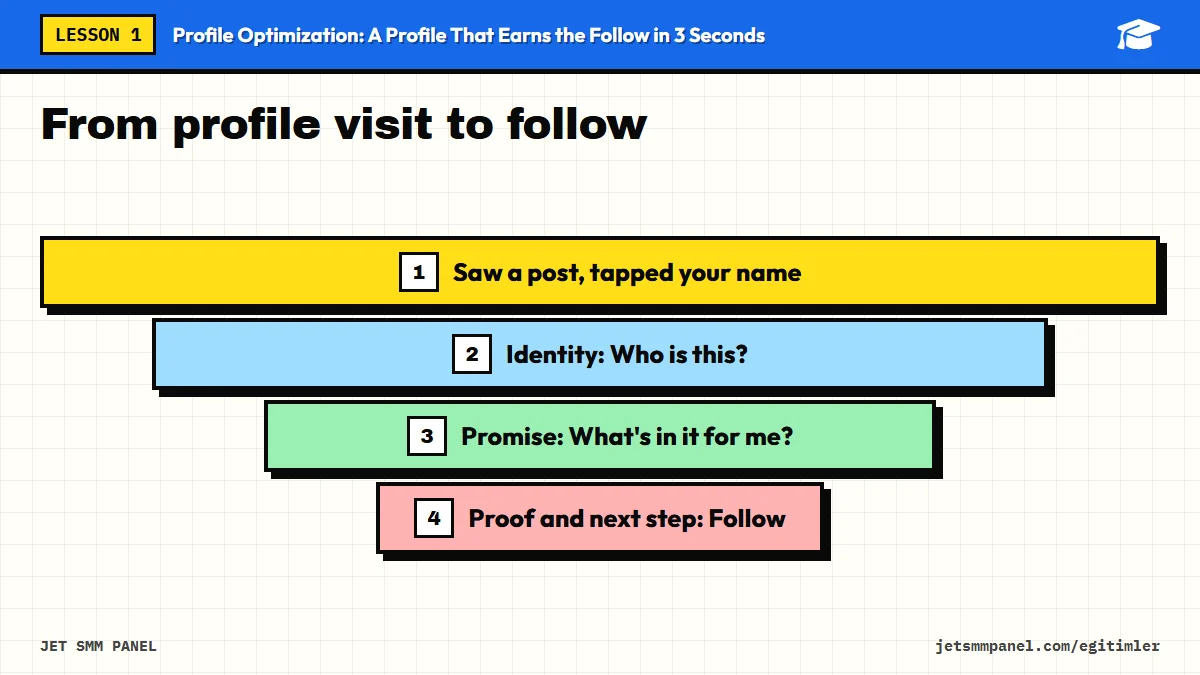
A profile page works like a shop window. Someone glancing at a window does not read every price tag; they take in the overall impression first, then one or two details that catch their eye. Profiles work the same way. Most visitors' eyes move roughly in this order:
"3 seconds" is not a measured statistic; it is a practical working rule. The point is not to time anyone with a stopwatch but to design your profile for a busy person who has never heard of you. Visitors sometimes stay much longer, but if the first impression is weak, they have no reason to.
The fields have different names on each platform, but the storefront logic is the same. The table below gives us a shared vocabulary for the whole course. Whenever later lessons mention "identity", "promise" or "proof", think of this table.
| Storefront element | Question it answers | TikTok | YouTube | |
|---|---|---|---|---|
| Identity | Who is this? | Profile photo, name field, username | Profile photo, name, username | Profile picture, channel name, handle, banner |
| Promise | What's in it for me? | Bio | Bio | Channel description, short text on the banner |
| Preview | What will I see? | Pinned posts, top of the grid | Pinned videos | Channel trailer, featured video, sections |
| Proof | Can I trust this? | Highlights (reviews, results, FAQ) | Pinned videos, playlists | Playlists, popular videos |
| Next step | What do I do now? | Bio link, contact buttons | Bio link (unlocked depending on account type) | Channel links |
Every part of your profile storefront answers one of three questions. If an element answers none of them, it is either unnecessary or in the wrong place. Get to know these questions well before you start the audit.
Visitors want to file you under a category: a person, a business or a topic account. Is this a hair salon, someone who cooks home meals, a coding instructor? Your photo, name and username do that categorizing together. If they contradict each other, say the name field reads "Sarah", the photo is a logo and the username is an unrelated nickname, the visitor gets confused, and confused visitors do not follow.
For the visitor, following is a small investment: they are adding a new account to their feed. They only do it if they expect something in return. That something might be knowledge, entertainment, inspiration, a discount or easy booking. Your bio's job is not to describe you; it is to tell the visitor what they will get.
Even if visitors understand the value, they may think "I'll check later", and that later often never comes. Pinned content, highlights that show a regular series, or a clear call to action pull the decision into the present. Even a simple rhythm statement such as "New recipe every Tuesday" is a strong answer to this question.
Because you look at your own profile every day, your eyes are used to it. You cannot see what is missing, because your brain fills the gaps with what you already know. When you run the audit, always use at least one of the "fresh eyes" methods below.
Now it is time to score your own profile. Give each item 0 (missing or poor), 1 (present but weak) or 2 (clear and strong). If you have accounts on several platforms, score each one separately; it is common for one storefront to be polished while another is forgotten.
| # | Audit item | What earns 2 points |
|---|---|---|
| 1 | Profile photo | Recognizable even when small, face or logo is clear |
| 2 | Name field | Includes a keyword describing what you do, next to your name |
| 3 | Username | Easy to read and can be typed correctly when said out loud |
| 4 | First line of bio | Says who you help and how, in a single sentence |
| 5 | Proof | Has a trust element such as experience, results, location or reviews |
| 6 | Call to action | Clearly tells the visitor what to do next |
| 7 | Link field | Goes to one clear destination, and the link works |
| 8 | Pinned content | Chosen for newcomers and up to date |
| 9 | Highlights / trailer | Organized and labeled; no leftover old campaigns |
| 10 | Cross-platform consistency | Same photo, name and promise on every account |
| Total score | Status | What to fix first |
|---|---|---|
| 0-8 | Weak storefront | Rebuild from the ground up; identity and bio first |
| 9-14 | Average | The skeleton is there; strengthen promise and proof |
| 15-20 | Strong | Fine-tuning; pinned content and consistency |
Example scenario: the owner of a small neighborhood coffee shop scores 9 points. The photo is clear and the name is right, but the bio only says "Coffee lover" and the link points to a campaign page from last year. In the fresh eyes test, a friend says, "Looks like someone who posts coffee photos"; they do not realize it is a shop. The three lowest items are obvious: the first line of the bio, the call to action and the link field. Fixing just those three can make more difference than hours of redesign.
The answer from the fresh eyes test is worth even more than the score table. If your friend describes your account the way you want it described, the storefront works. If they describe it differently, the gap between the two is exactly the message you need to fix. Keep that answer somewhere safe; we will repeat the same test in the final lesson.
In the next lesson we move on to the two most underrated parts of the storefront: the username and the name field. These two fields affect not only whether visitors recognize you, but also whether you show up in in-app search at all.
For every platform you use, take a "before" screenshot of your profile and score the 10-item table with 0, 1 or 2. Run the fresh eyes test with someone who does not know your account and write down their answer. Put your total score, your three lowest items and your friend's answer into a single note; it will be your roadmap for the rest of the course.