Blog Başlığı
Tarih
Most people choose their username in a few seconds on the day they open the account and never think about it again. For the name field, they type their own name or their business name and move on. Yet these two small fields are the storefront's first answer to "Who is this?", and they decide whether a visitor can remember you and find you again later.
In this lesson you will fix two things. First, a username that is easy to read, say and type. Second, a name field that includes the word people actually use when searching inside the app. Even if your account has been open for years, by the end of this lesson you will be able to improve at least your name field with confidence.
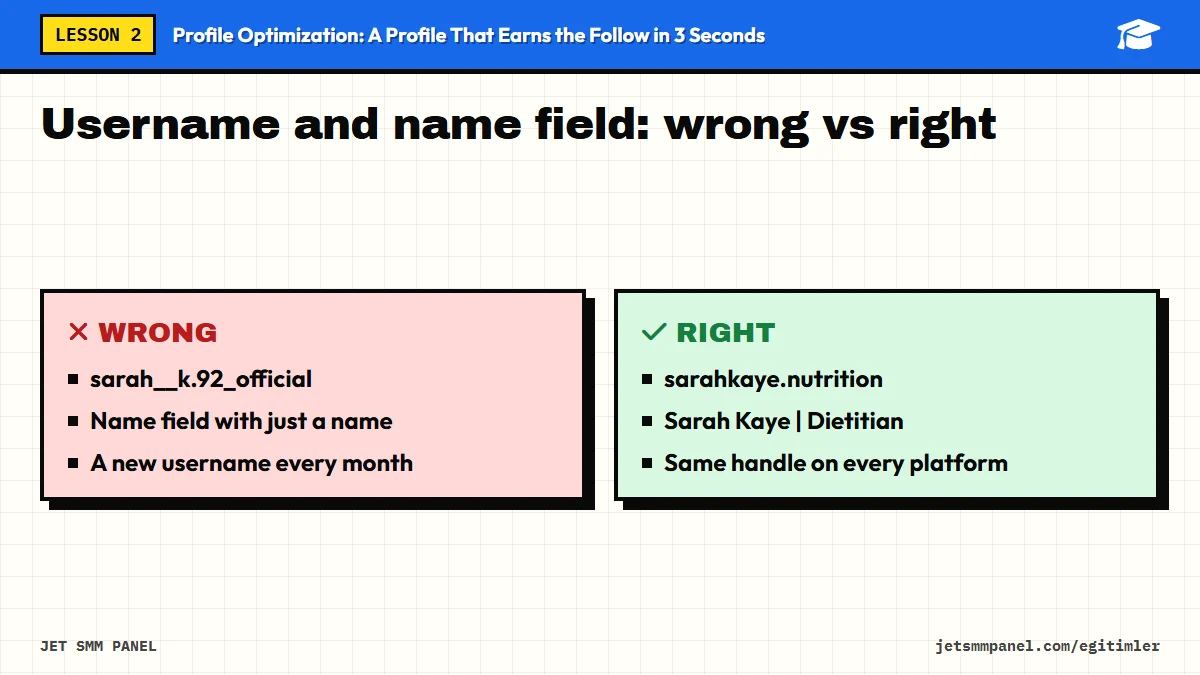
On Instagram and TikTok your profile has two separate identity fields: the username, which starts with @, and the name field shown near it (on TikTok it is simply called "name"). On YouTube their counterparts are the handle (@handle) and the channel name. These fields do different jobs, so you should not fill them in with the same logic.
| Field | Its job | What it should be | How easy to change |
|---|---|---|---|
| Username / handle (@) | Your unique address; used in tags, spoken out loud, part of links | Short, permanent, brand-focused | Risky Changing it can affect old tags and links |
| Name field / channel name | The title of your profile; also considered in search | Name + a keyword describing what you do | Limited Platforms allow changes only at certain intervals |
At the time of writing (2026), the commonly known limits are: on Instagram, the username can be up to 30 characters and the name field up to 64, and the name field can be changed at most twice within 14 days. On TikTok, the username can usually be changed once every 30 days and the display name once every 7 days. On YouTube, a handle must be between 3 and 30 characters, and the channel name and handle can only be changed a limited number of times within a set period. These rules can vary by account type and region; always check the current rule inside the app.
Your username carries your word of mouth. When a customer tells a friend "Check out this account", the friend needs to be able to type the name correctly on the first try. Run your own username through this checklist:
Usernames cannot contain accented or special letters such as é, ñ or ü. A business called "Café Lumière" has to write something like "cafelumiere". What matters is choosing the version people would naturally type. Dropping the accent and keeping the plain letter is the most common and most predictable approach, while creative spellings make people hesitate. In the name field you can usually use accented characters, so show your name there with its correct spelling, "Café Lumière".
The name you want may already belong to another account. Instead of adding random numbers to the end, use a meaningful extension: for businesses, something like "cafelumiere.coffee" or "cafelumiere.nyc"; for personal brands, something like "sarahkaye.nutrition". If the extension also says what you do, it pulls double duty. Stacking extras like "official", "real" and "the" on top of each other, on the other hand, creates suspicion rather than trust.
Do not change your username often. Your old name becomes available and someone else can take it; posts that tagged you under the old name, business cards, menus and shared links may no longer lead to the right place. If you need to change it, do it once, plan it, and update your printed materials at the same time.
On Instagram and TikTok, when someone types a word into the search box, results take into account not only usernames but also name fields. That is why your name field is one of the strongest fields affecting which words your profile can be found for. If you only type your name, nobody except people who already know you will find you. Add a keyword that describes what you do, and you improve your chances of appearing for people searching that word.
[Your name or brand name] | [The keyword people search for]
[Brand name] • [Service] [Neighborhood or city]
Example scenarios:
Stuffing your name field with keywords starts to look like spam at some point and lowers visitors' trust. Also, how platforms weigh fields in search can change over time; the name field is a helper, not a magic key. The goal is a natural phrase that both people and search can understand.
On YouTube, your channel name appears under your videos and in search results. The same logic applies, but a channel name is perceived more like a brand name than Instagram's name field is. That is why creators usually go with a combination such as "Daniel Reed | Python Tutorials" or simply a strong brand name, and then put the keyword front and center in the channel description and banner text. Try to keep your handle identical to your username on other platforms.
Your identity is now clear; people can recognize and find you. But a visitor first sees that identity inside a tiny circle. In the next lesson we will work on that circle, your profile photo, along with your profile's overall visual identity.
Run the phone test on your username: say it out loud to a friend and ask them to type it. Then, thinking about how your customers describe you, come up with three candidate keywords, check the search box suggestions and pick one. Update your name field using the formula and apply the same phrase to your accounts on the other platforms.
Buy the course to unlock the remaining 4 lessons.